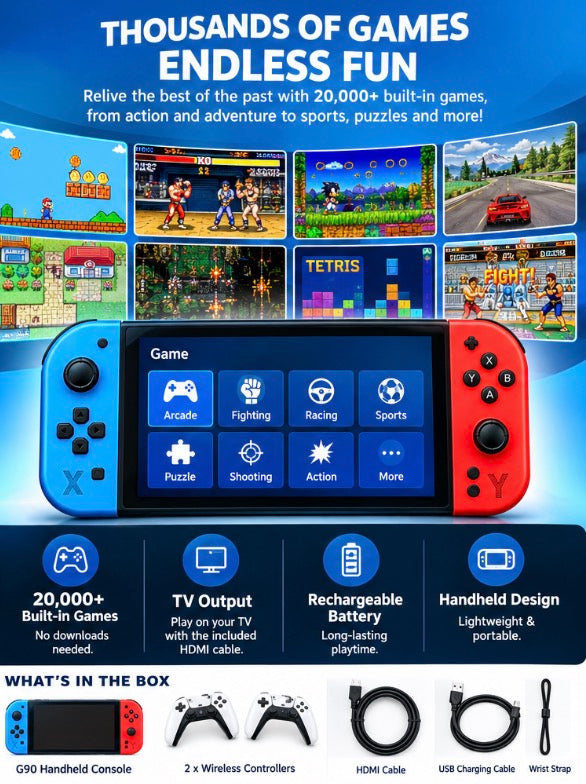
G90 Video Game Set
G90 Video Game Set
Regular price
$110.00
Regular price
Sale price
$110.00
Quantity
Couldn't load pickup availability
Tested In Our Shop
Ships Across Canada
Pick Up In Mississauga
- Enjoy gaming anytime, anywhere with the G90 Handheld Video Game Console! Featuring a 7-inch HD.
- With two wireless controllers included, it’s perfect for solo gaming, family fun, and multiplayer entertainment.Key.
How To Use It
## How to Use the G90 Handheld Video Game Console
**1. Charge the Console**
Connect the console to a suitable USB power source using the included USB charging cable. Charge it before playing if the battery is low.
**2. Turn On the Console**
Press the power button to switch on the console. Wait for the main menu to appear.
**3. Choose a Game**
Browse the menu and select from the **20,000 pre-installed games**. Use the console's built-in controls to navigate and start playing.
**4. Play on the Handheld Console**
Enjoy gaming directly on the 7-inch HD screen using the built-in buttons and controls.
**5. Connect to Your TV**
Connect the included HDMI cable between the console and your TV, then select the correct HDMI input on your TV. Follow the console's on-screen instructions to begin playing on the big screen.
**6. Use the Wireless Controllers**
Turn on the included wireless controllers and pair or connect them to the console according to the device's instructions. Enjoy multiplayer gaming with family and friends.
**7. Turn Off After Use**
Save your progress if the game supports it, then use the power button to turn off the console.
**Enjoy gaming anytime, anywhere — on the handheld screen or your TV!**
**1. Charge the Console**
Connect the console to a suitable USB power source using the included USB charging cable. Charge it before playing if the battery is low.
**2. Turn On the Console**
Press the power button to switch on the console. Wait for the main menu to appear.
**3. Choose a Game**
Browse the menu and select from the **20,000 pre-installed games**. Use the console's built-in controls to navigate and start playing.
**4. Play on the Handheld Console**
Enjoy gaming directly on the 7-inch HD screen using the built-in buttons and controls.
**5. Connect to Your TV**
Connect the included HDMI cable between the console and your TV, then select the correct HDMI input on your TV. Follow the console's on-screen instructions to begin playing on the big screen.
**6. Use the Wireless Controllers**
Turn on the included wireless controllers and pair or connect them to the console according to the device's instructions. Enjoy multiplayer gaming with family and friends.
**7. Turn Off After Use**
Save your progress if the game supports it, then use the power button to turn off the console.
**Enjoy gaming anytime, anywhere — on the handheld screen or your TV!**
How We Tested It
3 weeks of real use, in our own cars and in the shop.
It works every time, or we don't sell it.
It works every time, or we don't sell it.
Shipping & Pickup
Ships across Canada. Cost shown at checkout.
Pick up at Shop 1B14, 7215 Goreway Dr, Mississauga. Call first.
Pick up at Shop 1B14, 7215 Goreway Dr, Mississauga. Call first.